Anti-Phishing Solution and awareness in the Corporate and Banking sectors

Introduction

A phishing email is a serious matter. 91% of all cyberattacks start with phishing emails. Taking actions to protect against phishing attacks is the most important aspect now, with a robust and intelligent solution. This article will help you understand the overview, challenges, solution, and plan strategy.

Overview about the challenge of phishing scams attacks in the Banking and corporate sector

Several highly successful cyber threats are based on phishing techniques. In broad, phishing is utilized to exploit banking credentials for stealing, either directly, via spoof sites, and utilizing installed malware. Some examples incorporated with these below factors:

Bank-Targeted Phishing

Spear phishing, an alternative to phishing, is an intensely thriving method established on social engineering. That is based on manipulating human behaviour and particularly targeting a known user. Bank phishing attempts mainly concentrated on staff such as IT administration staff. Employees target a spear-phishing attack in the finance sector, the most targeted enterprise.

Customer-Targeted Phishing–Companies

Many organizations are getting targeted via a strategy called ‘Business Email Scams’ or BES. The email usually has a critical request to share money with a bank account (the cybercriminal holds that). It highly spreads a BES threat; the cybercriminal takes time to know their victim and whom they supply with social engineering schemes to mislead employees of a business into believing they have received an email from a high-level leader, such as a CEO or CFO.

And using this scheme and technique, they are already able to achieve it. Recently, USA-based FBI Bank has warned about this customer target phishing scheme to their users.

Customer-Targeted Phishing – Individuals

In this customer, targeted phishing attackers are more focused and target mobile banking with malware, particularly written to manipulate mobile banking users. 

It is a remarkably sophisticated phishing technique called “Android fake login." It is easily operated and performs by discovering which mobile banking app an individual is using. Then they spread the spoof interface, which detects the user’s login credentials once they enter on the spoof page.

‘Smishing’ is the latest phishing that includes a text message with web links to a spoof site. Attackers intercommunicate this with the bank site, which requests login credentials to the mobile users. As banking sectors are crucial sectors, they send the text message to customers for valuable communications to the users, and they request to send instant bank transactions using mobile apps.

Solution of Firewall Protection against Phishing Scams

How to stay up to date on a phishing scam

Fortunately, there are methods to avoid this situation to overcome the cyber phishing scam. Here we have the guidelines it can help the organization and end-users. These guidelines make users aware so that they can be more alert and follow the basic rules.

Think Before You Click! : 

The user must understand what are they trusted or untrusted sites. Hence, before clicking on undesirable web links or any instant messages and random emails, they should ensure what to click and open or not. A phishing email may declare to be from a legitimate business, and when the user clicks the link to the website, it may look. They may seem like it is a genuine website, and an email may request you to fill in the details, but the email may not include the username. Most phishing emails usually start with “Dear Customer," so according to that, a user should be alert when they come across such type of emails. Instead of clicking on a dangerous link, they can go straight to the source and report to a phishing alarm.

Install an Anti-Phishing Toolbar:

Here we have a mechanism, an Anti-Phishing Toolbar, which is most prominent and customizable on various Internet browsers. These toolbars can be usable on the sites while visiting the page; they can be secure. As it is free, users can plug into their browsers and have a more secure experience. We can consider it is a more protected layer against phishing scams. 

Confirm a Site’s Security:

In this secure solution, method users should be more focused on providing sensitive financial data online. They should follow the secure techniques using the fundamental understanding such as the website’s URL should begin with “HTTPS." There must be a closed lock icon close the address bar. They should ensure the website’s security certificate. If they receive any malicious files, they do not need to open the website and download files from suspicious emails or websites. Sometimes search engines may contain specific links which may reach the users from a phishing webpage, such as offering low-cost products. If a user makes purchases at such a website, cybercriminals can access their credit card details.

Use Firewalls:

High-quality firewalls perform as buffers between the user and system and external intruders. Users must use two additional kinds: a desktop firewall and a network firewall. The desktop firewall is a kind of software, and the network firewall option is a kind of hardware. 

When we use them together, they drastically decrease the chances of hackers and phishers entering your computer or network.

Use Antivirus Software:

There are several reasons to use antivirus software included with Unique signatures antivirus software guards as users. We need to make sure their software should be up to date. Anti-spyware and firewall configurable settings should control phishing attacks, and users should modernize the programs regularly.

Firewall protection controls access to malicious and irrelevant files by blocking the attacks. Antivirus software inspects each file that arrives through the Internet to the user’s system. It enables the user to prevent harm to your system. With the help of the latest updated antivirus software, users no need to fear phishing scams.

Strategy and plan and resolution from Simple DMARC for securing emails and brands from their services 

DMARC provides the best-advanced threat strategy plan to solve these types of phishing attacks

Link protection: 

This solution does not allow users to click on suspicious links as phishing emails won’t reach the user’s email inboxes. Using this can protect every email in real-time-based techniques.

● It also protects confidential data and more extensive corporate networks from phishing attacks.

● Each time a user gets an email with a suspicious link delivered to the users’ inbox that looks like phishing, the system administrator can get the alert and notify them that they can know this and troubleshoot and fix it.

● This assertive level of scanning and monitoring is the best way to protect users from both direct and delayed attacks. 

Protect your computer by utilizing security software.

DMARC suggests the rule to set up your software to update automatically so it can handle any unknown security threats.

Secure your mobile phone by specifying software to update automatically. DMARC suggests these important updates could protect the user against security threats.

Watch your accounts by utilizing multi-factor authentication: Some accounts suggest additional protection by directing two or more credentials to log in to the user account. We can consider it as multi-factor authentication. These credentials users need to log in to your account comes into two categories:

● Something users have: A passcode user gets through an authentication app or a security key.

● Something users are A scan of the user’s fingerprint, eyes retina, or face.

● Multi-factor authentication makes it more formidable for scammers to log in to user accounts to acquire a username and password.

Protect your data by backing it up. Users can copy computer files to external cloud storage hard drives or smartphones. DMRC provides the guidelines to back up your data and ensure these backups aren’t related and connected to the user’s home network.

Intelligent Cybersecurity Awareness Training

DMARS provides training for the employees who experienced phishing attacks in their organization or banking sectors for the standard cybersecurity awareness training services.

They connect Phish Threat email to check the users who have been faced or blocked from visiting a website because of its risk profile and provide the best solutions.

How to train employees on Email Phishing scam

●   Keep the employee informed About Phishing Techniques: Users must know the latest invention of phishing scams. For IT administrators, continuous security awareness training and simulated phishing for all users are highly suggested in maintaining security top of mindset throughout the organization.

●   Check Online Accounts Regularly: This is a good practice for checking online accounts regularly and changing your passwords. To protect bank phishing and credit card phishing scams, a user should privately check their statements as regularly. They should check their monthly statements of financial accounts and scan every entry carefully to confirm it has made no dishonest transactions without their learning.

●   Keep Browser Up to Date: Security patches are regularly released from many browsers as per the defined time. They are helpful for an overcome phishing attacks and making websites more secure. Sometimes we may ignore them, but we should practice updating the browsers. It just takes a minute to update, download and install it.

●   Be Cautious of Pop-Ups: Users also need to be cautious of irrelevant Pop-up windows that frequently come when they visit the website and force them to click or open it. We can consider this as also phishing attempts. Many popular browsers inbuilt customizable settings allow users to permit block pop-ups. Using this, users can easily block unrelated pop-ups and allow only relevant ones.

●   Never Give Out Confidential Information: As a common rule and understanding, a user should not transmit personal or financially prudent information over the Internet. It is the most important rule we should follow in our daily routine. Many phishing emails will lead you to pages where entries for financial or personal information are needed, and it will force users to enter their information. To protect this, users should not make confidential entries via the links delivered in the emails. They should not send an email with sensitive data to anyone. As a user, they need to make it a practice to match the website’s address. As per the secure website standard, it starts with “HTTPS".

Conclusion 

We hope this article helped you understand the Anti-Phishing Solution. Here we understood the challenges and solutions and how to train employees from the corporate and banking sectors with the best strategy plans of email protection. This article will be helpful to professional developers from the cyber-security and application security teams. You will find these blogs and content in the DMARC community from SimpleDMARC.
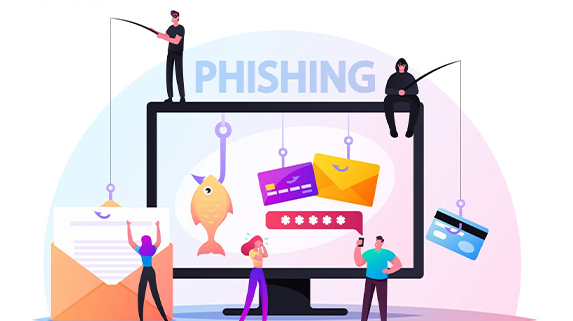
Phish, Blow Phish and No Phish

Phish+ing – Phishing Be Aware of this.

Phishing is a form of fraud attack where attackers masquerade as authenticated sender to trick the receiver into believing it is real communication and steal the user's confidential information such as login credentials, card details, etc. An attacker tricks users into opening malicious links or install some RATs or Malwares, which can be further leveraged to attack the user's system.
Most of the phishing attacks are executed over E-mails. The attackers, in general, send a large number of e-mails. If a small percentage of people also fall for this and give out their confidential information, then attackers important information that would help them in the bigger attacker.
Phishing is a Social Engineering Attack where an attacker finds a way to trick users by sending them e-mails that looks legitimate as real e-mails with some unnoticeable difference which is quite hard for ordinary users to identify.

The attackers use the victim's information to trick them into falling for the phishing attack by user-targeted Phishing. For example, an attacker would be sending fake offers or security e-mails like changing passwords, easily fooling the user into falling for the attack.
In some cases, attackers use the real domains of the organizations to send the e-mails to the users. This kind of phishing attack is much effective as the user will not think as if it's a malicious

activity as the mail received is from the real domain from the organization where it's supposed to be from, and this will easily trick the users into believing it's an authentic mail. The attack executes successfully for an attacker.

Blow Phish – Different Type of Phishing Attacks

There are different kinds of Phishing attacks. However, below discussed are some broadly categorized types of phishing attacks.

1. E-mail Phishing

E-mail phishing is the most common and broadly carried phishing attack by attackers. In e-mail phishing, the attacker tries to mimic the real e-mails of the organizations with unnoticeable changes to trick the users.
Fake domains or substitutions like replacing 'w' with 'vv' make the e-mail look authenticate; such differences for regular users are difficult to notice.

2. Spear Phishing

Spear phishing is targeted Phishing that targets the specific user or the group of people. Some are similar community based like employees of one organization, so targeting this spear phishing is carried out in which attackers already have the victims' information like name, job profile, contact details, etc.
In spear, phishing attackers design the e-mails according to the targets, making it easy to trick victims.

3. Whaling

Whaling is similar to spear phishing. It is also a targeted attack, but in whaling, the targets are the high authorized person or senior management of the organization.
In a whaling attack, the common techniques used by the attackers, as we discussed in e-mail phishing, such as using look-alike domains or mimicking the real e-mails, may not work as a victim is a high authorized person. They may not fall for such a trick, so in whaling, attackers craft the mails using personalized information of the target, such as tax returns, lawsuits, family-related, etc.

4. Smishing

In a smishing attack, the attacker uses mobile text communication as a mode of communication to carry out the phishing attack.
The malicious links are sent through the text message and a personalized message that tricks the victim, and the attack is executed.

5. Vishing

Vishing is the kind of phishing attack where the mode of communication is phone calls. The fraud phone calls are carried out where attackers masquerade the authorized person's identity and make the victim believe it is real communications and attack is executed, or the victim gives out the information.
Most popular vishing attacks nowadays are where attacker scams the people for paying money by making a fraud calls.

6.Watering Hole Phishing

This attack is quite an advanced attack than all the phishing attacks where attackers do not target the victim directly; rather, they compromise or attack the websites or services which victim uses the most, so when the victim uses that service, they fall for the phishing attack that is be implanted by the attacker.
Such attacks are hard to identify and give additional benefits for the attackers as not only targeted users but all those who visit the compromised website get affected by the attack that is just additional victims for the attack executed.

No Phish – Mitigations to avoid Phishing attacks:

  • Always check the sender of the mail check for any spoofing or spelling errors in domains.
  • Always check for the URLs present inside the mails and open the links only if the e-mails are from trusted sources.
  • Use trusted sources only; never give out personal information on any unwanted platforms.
  • Never trust suspicious calls.
  • Implement multi-factor authentication on services you use for additional security.

Protect your Domain.

As an organization, you need to protect your customers or people from phishing attacks that use your domain for sending Phishing e-mails. Therefore, you need to implement a system that will authenticate the real mails sent from your domain and tell the user if the mail received from your domain is legitimate or the false mail they need to avoid communication with to avoid loss.

DMARC here comes as a saviour for the organizations to handle these e-mail attacks, so implementing DMARC for your organization's domain can prevent usage of your domains from sending false e-mails by attackers.

DMARC stands for Domain-Based Message Authentication, Reporting, Conformance. DMARC is an E-mail validation Standard that helps in the prevention of e-mail spoofing.

DMARC works with or builds upon two more E-mail protocols SPF(Sender Policy Framework) and DKIM(DomainKeys Identified E-mail).

DMARC acts at a gateway or mail server to authenticate e-mail whether it's from the real source, i.e. the domain entry is present at DNS records by passing it through both SPF and DKIM validation protocols and aligning them if the e-mail gets aligned, then it is verified and sent to receiver otherwise quarantined or gets rejected.

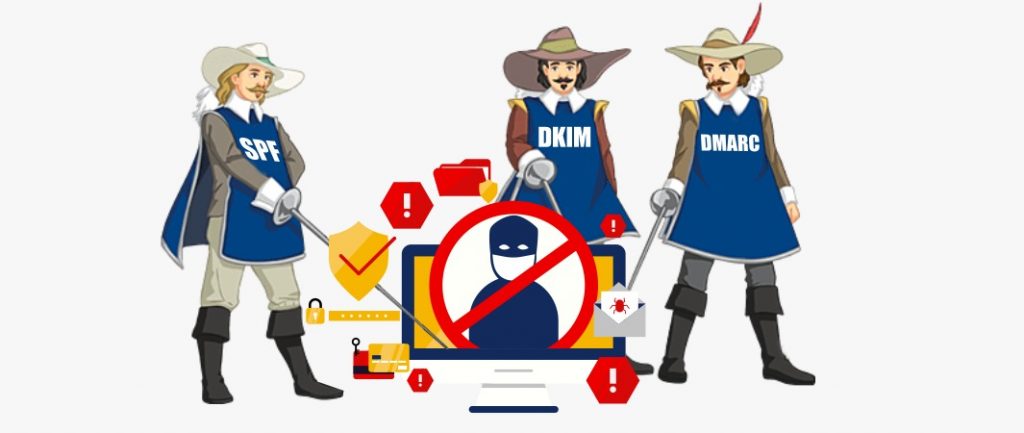
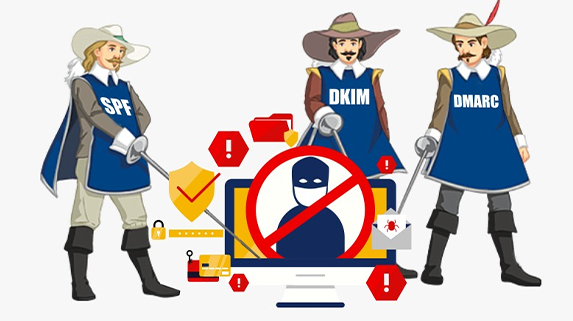
Three Musketeers – DKIM, SPF and DMARC

Three Musketeers –
DKIM, SPF and DMARC

THREE MUSKETEERS TO SAVE YOU FROM BEING A PHISHING VICTIM & VALIDATE EMAIL AUTHENTICITY

Phishing Attacks: Email is Cybercriminals’ Number One Target

For many of us, the threats are most likely to arrive as emails or attached to emails. Cybercriminals use emails as a bridge to spread malware and infect computers in various ways. Tricking users into clicking malicious links and downloading an attached file that would run the malicious code on user machines is one of the most known.

Did you know that 60% of all worldwide email traffic is marked as SPAM or phishing? That’s a significant percentage. While you’re sending emails, there might be others sending emails on your behalf. They mask their identity by sending it on behalf of your domain. Both emails are delivered to the inbox of the receiver. At this point, the email that the hacker sends is so well-crafted that it looks like a legitimate email from a brand or company the receiver knows. Trusting and assuming the email is authentic, the receiver opens the email and clicks the link without doubting malicious. And, of course, he takes his place among those who fall for the trick; now, he’s going to be taken to a fake website that collects his information.

You may be assuming you already know all this stuff and take your precautions. However, there isn’t a day that passes where scams aren’t in the news one way or another. Phishing scams remain one the most frequent attacks that happen. If you don’t want to become the next victim, you should know how to use the latest weapon in the war against spam.


Three Musketeers - SPF, DKIM and DMARC


SPF – The First Musketeer

SPF stands for Sender Policy Framework. It is an email authentication technique that validates an email message sent from an authorized mail server to protect email senders and recipients from spam, spoofing and phishing. It is designed to prevent spammers from sending forged emails from the domain they’re claiming to be. When a spammer attempts to send an email from a faked address, the message will be marked as suspicious and be rejected by the email receiver.

Now, you may wonder how SPF works.

Here are three steps how the process works:

  1. With SPF, a domain administrator can publish authorized mail servers to send an email from that domain. SPF record is included in an organization’s DNS database, and it is a specially formatted form of DNS TXT record. So, you can specify which IP addresses and hostnames are authorized to send emails from the specific domain in the SPF record.
  2. When the mail receiver receives an incoming email, it uses the “envelope from” address of the mail (mainly the Return-Path header) to confirm the sending mail server is included in the SPF record comparing the IP address of the sending domain with the authorized IP addresses.
  3. The mail receiver uses the rules specified in the sending domain’s SPF record to accept or reject the email message.

If you are a company sending commercial emails, you’ll need to have one form or more of email authentication techniques to verify that an email is from your company. Apart from SPF, new email authentication techniques have evolved and lead to DKIM and DMARC. According to some email experts, implementing DKIM and DMARC is necessary to define a complete authentication policy.

However, we should consider SPF as one of the significant steps to improve your deliverability and still plays an essential role in determining whether an email is DMARC Compliant.

DKIMThe Second Musketeer

DKIM stands for Domain Keys Identified Mail. It is an email authentication technique designed to help the receiver make sure that an email is indeed sent and authorized by the owner of that domain. It uses public-key cryptography to sign an email with a private key, showing if an email message is sent from an authorized mail server. Once recipient servers verify that the email is signed with a valid DKIM signature, certainly, the message body and attachments haven’t been modified during transit. So, parts of the email are considered authentic. As the validation is done on a server level, end-users usually cannot see the DKIM signature.

With the DKIM standard, your email deliverability will improve. Along with DMARC and even SPF, using DKIM records will help you prevent malicious emails sent on behalf of your domain and create multiple layers of security for domains sending emails.

DKIM isn’t a required standard. However, your email signed with DKIM look more legitimate to your recipients and, therefore, less likely to go to Spam or Junk folders. Therefore, adding a DKIM record to your DNS is highly recommended whenever possible to authenticate mail from your domain. Implementing DKIM makes it harder to spoof email from domains that use it.

Let’s move on to how DKIM works.

  1. The outbound mail server sends a message. The server generates a unique DKIM signature header. This header contains information on how the signature is generated.
  2. Inbound mail server or recipient server receives the message and looks up the sender’s public DKIM key in DNS to verify the signature. The recipient server uses this key to decrypt the Hash value in the header and compare it to the values from the received mail. If they match, the MTA (Mail Transfer Agent) that generates the DKIM signature knows that the DKIM is valid, and the email has not been altered.

DMARC – The Third Musketeer

DMARC or Domain-based Message Authentication, Reporting & Conformance is a free and open technical protocol that uses SPF and DKIM mechanisms to determine the authenticity of an email message. DMARC is built upon SPF and DKIM. DMARC brings consistency to how SPF and DKIM technologies are configured. With DMARC in place, large and small domain owners fight against phishing and spoofing. Together the Three Musketeers are considered the best practice to hinder email spoofing and phishing attacks. Without setting up both SPF and DKIM, DMARC does not work. If you apply the process carefully, using the DMARC Analyzer tool, you can receive DMARC reports containing detailed information about who is sending emails on your behalf.

If you’re a business owner, you want to ensure that only your customers can see emails sent by yourself. For this reason, DMARC is a must for domain owners. When you secure your email with DMARC, email receivers will identify the email as legit and originates from you, positively impacting email delivery.

Let’s look at briefly how DMARC works:

  1. A domain administrator publishes a DMARC DNS Record at their DNS hosting company.
  2. When an email is sent by someone spoofing the domain, the inbound mail server uses DNS to look up the DMARC policy for the domain in the message’s “From” header.
  • The three checked key factors are as follows:
    • Does the message have the DKIM signature that validates?
    • Does the IP address of the sender match authorized senders in the SPF record?
    • Do the headers in the message pass “domain alignment” tests?
  1. With the SPF and DKIM results on hand, the server is ready to apply the sending domain’s DMARC policy (p=none, p=quarantine, or p=reject)
  2. The inbound mail server will report the outcome to the sending domain owner, deciding what to do with the message.

In short, originally, SPF and DKIM helped protect your domains from scams. However, it’s not that hard for hackers to bypass these security measures. If you wish to secure your domain and email channel fully, DMARC forms a link between SPF and DKIM. DMARC overcomes the problem by ensuring that the domain seen by the end-user is the same as the one validated by SPF and DKIM.

  • SPF verifies that the sending server is authorized to send messages using a domain in the first place.
  • DKIM ensures messages remain unchanged in transit between the sending and recipient servers
  • DMARC uses SPF and DKIM to identify if a message is legitimate and whether it should be delivered to the recipient or blocked in the first place.

E-Mail Innovation to Evolution and Future

E-Mail Innovation to Evolution and Future

Introduction:

This year we completed the 50th year of e-mail, let's talk about E-mail's Innovation and future.  In these decades, we have seen the difference in the evolution of the e-mail journey. There is controversy about the innovator of E-mail. Mr. Ray Tomilson and Mr. Shiva Ayyadura both claim to be the inventor of the E-mail.

These days, there are various advanced levels of development in communication ways using e-mail. This article will understand the evolution of the e-mail journey with the best practice of managing your e-mail with security.

What was the primary e-mail?

Mr. Ray Tomilson's claim prooven by his contribution at RFC-561. That is used while referring to the mailing system. This document has developed a modern-day mailing solution are using this RFC for E-mail communication.

Mr. Ray Tomilson started working on a communication system when working with ARPANET. His Idea to use the “@” Sign would help the computer communicate to know which user and computer it has to send the E-mail.

Also, Mr. Shiva Ayyadura invented E-Mail at the age of 14. He was studying at Livingston High School (New Jersey) in 1978 as a computer program to communicate between the office. He has developed The FORTRAN Based Program to allow the University of Medicine and Dentistry of New Jersey (UMDNJ) office.

Shiva got his program Registered with the Copyright Office of the USA. The copyright he got for the program in 1982.

So, we have two versions about Invention the E-Mail that is now the standard way to communicate between Companies and Persons. There are almost 2.4 Billion E-mails are being sent per second.

When did everyone use “e-mail”?

In the Early days of computer communication. The terminology used for the early computer-to-computer communications was “electronic mail message.”

Merriam Webster discovered the primary use of the word “e-mail” in 1979,

An E-mail has become a very popular communication channel for business and individual use. It was the original version of an entirely web-based e-mail rather than a specific software for sending and receiving e-mails. Tomlinson elaborated the use of the “@” symbol in the sender e-mail address. with the subject, date, body from the e-mail, with the “from” field.

It was an essential innovation in the archives of electronic messages. Later in 2004, Google discovered the original iteration of the presently ubiquitous Gmail. Later Google changes the name to Google Workspace. Microsoft launched its Office 365 product in 2011 for corporate communication in the cloud.

These cloud-native solutions have transformed how organizations can do business more efficiently. Including e-mail as the foundation that succeeded with this digital innovation and transformation. There are almost 5 Billion mailboxes around the world. These are professional and personal e-mails that one can communicate.

We use e-mail to help with an abundance of objects, and it helps to the growth and more productive ways to meet the customer requirements.

The Addition of Email Cyber Threats

When E-mail is helpful for fast communication in personal and professional ways, it can cause cyber threats. E-mails are getting attacked using various forms as The E-MAIL is becoming routine for everyone. Attackers can misuse e-mail to gain authority over an institution, access private data, or interrupt IT access to devices. Here are the common factors of cyber threats.

Below are the general threats to e-mail operations involve the following:

Malware: Malware is the threat where attackers can use “malicious software.” Malicious Software involves worms, viruses, spyware, and Trojan horses. Malware can attack and misuse to exchange privileges and access delicate data and information—malware than accessing your work-related activity.

Spam: Spam E-mails are those E-Mails that you got, but you don't want them. The average e-mail address globally is getting 10 to 15 E-Mails a day as spam E-Mails. Spam E-Mails are increasing day by day, and we all are getting thousands of E-mails. These E-mails are mostly about Marketing or product-related E-Mails.

Phishing: Phishing is E-Mails trying to lure you by pretending that E-Mail is from someone you know and trust. The attacker uses these E-Mails to gather information or deliver Malicious Software called malware. Phishing is currently the most popular to get information or attack targets with Ransomware.

Social engineering: An attacker can hack into a computer system in this threat. An attacker can use e-mail to collect delicate user data from any organization and execute social engineering attacks using e-mail spoofing. A person can successfully cover as different by misrepresenting the sender data displayed in e-mails to hide the trustworthy source.

Entities with evil plans. An attacker can easily attach to the organization's mail server and network, get the user data and restore the passwords in this threat.

E-mail is one of the highest threats to an organization's cybersecurity and institute. Various malware programs can obtain into an organization's system and destroy everything. We should need to know the best techniques and methods to overcome this.

Below are the top 10 techniques we should follow.

  1. Use a password manager with strict and unique rules using two-factor authentication
  2. If you are signing up for a different or new e-mail service, review for 2FA provider
  3. Do not click or accept doubtful or suspicious links in texts or e-mail
  4.  
  5. Apply and practice with VPN on your computer, laptops phone, or tab gadgets
  6. Do not use unrestricted Wi-Fi or unknown computers.
  7. Use strong antivirus software with real-time protection techniques from phishing attacks and threats to malware attacks.
  8. Protect your router and Wi-Fi.
  9. Maintain your computer and smartphone to keep the Operating system (OS) up-to-date with the latest released updates.
  10. Reconsider establishing a credit freeze on your account.
  11. Avoid unwanted e-mails and report to phish alarms.

Where E-mail Attains Today

As per today's modern time and generation, e-mail attains additional features. AI and ML-powered new Gmail would be a great product. The power of AI and ML is when you send an e-mail using Gmail in your e-mail body, you can get common recommendations.

The Future of E-mail using the security methods

In the coming time, we can see the lots of innovations in E-mail significant in the development of advanced communication with the best security methods and schemes.

Universal Adoption of TLS Encryption and IPSEC

In this latest development on sending the message transferred using encrypted across the Internet from the sender's server to the recipient in a subsequent couple of years, it would be mandatory to define a TLS connection. Same time we can expect unique technology as IPSEC. It is based on the IPv6 protocol with more enhancement on Internet encryption, and it would apply not only to e-mails but also to VOIP and web traffic.

E-mail encryption using GlobalCerts SecureMail Gateway (SMG) permits the administrator to define granted 'TLS domains.' With the help of this, it will implement a TLS connection while delivering the mails.

Message Integrity and Authenticity: This will be the more focused initiative from the innovation mechanism in Email-Security

Domain-based Message Authentication, Reporting, and Conformance (DMARC)

DMARC is the internet protocol (RFC 7489) primarily centered on ending the spoofing of e-mail domains. It permits senders to identify their received messages by a technical tag that the receiver can authenticate. DMARC provides the technologies with a proven system and not authenticates but validates the E-mail communication. It would help us to fight against phishing.

Closing Open E-mail Doors

Using the public Internet to receive and send e-mail is not the only technique to communicate a specific message. This approach is already consolidated in today's messaging system in all the social media platforms. The technique is to build on the web portal. Website to accept the communication, and the organization has already adopted this process.

Conclusion

This article will help you know common threats challenges, e-mail protection, and current and future e-mails. I hope this article has helped you to understand E-Mail. To keep you updated with the latest phishing and e-mails. Pleased subscriber PhisherSafe powered SimpleDMARC.